
BitFaster Professional17 - Download
You'll be able to download in few seconds.
Publisher Description
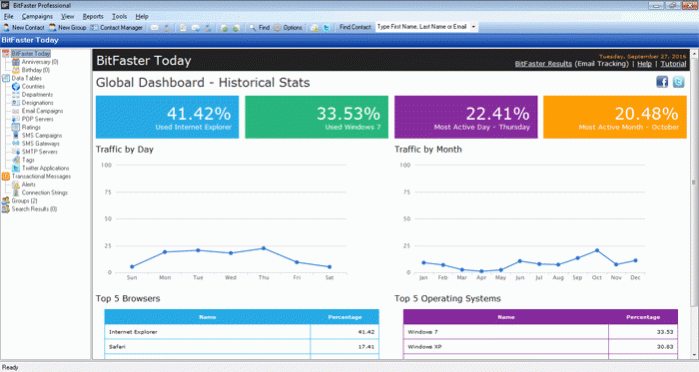
BitFaster is an award winning Email Marketing and Automation Software that's designed to help you grow your business. It can be used for Email Marketing, SMS Marketing and Tweeting. Whether you are a small business owner or an enterprise organization, BitFaster can help you achieve your goals with minimal effort and investment. It's got everything you need to create, manage, send, track and analyze your Campaigns.
You can even use it for sending out SMS campaigns. Just connect to any SMS gateway provider of your choice and you are all set to go.
Features:
- Built-in database to manage your Groups and Contacts
- Manage unlimited Email/SMS Campaigns, Tweets
- Eliminate chances of being labeled a Spammer (No CC or BCC allowed)
- Spam check your Email Campaigns
- Unicode support (multi-lingual messages) and A/B Split Subject Testing
- Personalize every Email/SMS message sent (66 System Variables supported)
- Use Dynamic Content in your Campaigns
- Support for Dynamic Attachment
- Integrates with Google Maps
- Your database is safe and secure on your system and not hosted somewhere
- Connect to any third party SMS Gateway that supports HTTP/S protocol to send SMSs
- Hands free subscribe/unsubscribe and bounce management
- Domain Exclusion List
- Track and Measure the Success of your Email Campaigns using BitFaster Results
- Customize your Report formats
- Send Transactional Messages (Marketing Automation)
- Connect to any Database or Excel Worksheet to send Alerts
About BitFaster Professional
This Other Email Tools program is available in English. It was last updated on 29 September, 2026. BitFaster Professional is compatible with the following operating systems: Windows.
The company that develops BitFaster Professional is Success Planned FZE. The latest version released by its developer is 17.
The download we have available for BitFaster Professional has a file size of 8.4 MB. Just click the green Download button above to start the downloading process. The program is listed on our website since 2018-05-14 and was downloaded 0 times. We have already checked if the download link is safe, however for your own protection we recommend that you scan the downloaded software with your antivirus. Your antivirus may detect the BitFaster Professional as malware if the download link is broken.
How to install BitFaster Professional on your Windows device:
- Click on the Download button on our website. This will start the download from the website of the developer.
- Once the BitFaster Professional is downloaded click on it to start the setup process (assuming you are on a desktop computer).
- When the installation is finished you should be able to see and run the program.
Program Details
System requirements
Download information
Pricing
Version History
version 17
posted on 2018-05-14
BitFaster Alerts - Automation & Data Transformation
version 14
posted on 2017-03-22
BitFaster Alerts - Send Personalized Transactional Messages
version 4.0
posted on 2009-05-07
Auto Subscribe/Unsubscribe, HTML Editor, Multiple SMTP Servers for sending Campaigns, Scheduled Campaigns etc.
Disclaimer
External Download
We do not host BitFaster Professional on our servers. We did not scan it for viruses, adware, spyware or other type of malware. This app is hosted by the software publisher and passed their terms and conditions to be listed there. We recommend caution when installing it.
The external download link for BitFaster Professional is provided to you by apps112.com without any warranties, representations or guarantees of any kind, so access it at your own risk.
If you have questions regarding this particular app contact the publisher directly. For questions about the functionalities of apps112.com contact us.
